
Introduce the concept of Building Details Drawing and explain their importance in ensuring construction accuracy. You can also mention how they link design intent with on-site execution.
What Is a Building Details Drawing?
- A building details drawing is a technical drawing that focuses on a specific part of a building, shown at a larger scale than general plans.
- It explains exactly how components such as walls, slabs, windows, doors, roofs, or staircases are built and connected.
- The goal is to translate the architect’s and engineer’s design intent into clear, buildable information for contractors and site teams.
- Unlike floor plans and elevations, which show the overall layout, detail drawings zoom into junctions and layer build-ups.
- These drawings often show materials, thicknesses, insulation, waterproofing, finishes, and fixing methods in one clear view.
- A building details drawing usually includes references back to plans and sections using callouts and section marks so the drawing is easy to locate in the full set.
Why Building Detail Drawings Are Important
- Detail drawings eliminate site ambiguity, preventing costly rework and errors.
- They coordinate architectural, structural, and MEP systems at junctions for better estimation and compliance.
- Revit workflows enhance durability, safety, and sequencing by automating updates and clash checks.
💡 Get BIM documentation service with accurate building details | [Contact AMC Engineer → Contact Us]
Main Types of Building Detail Drawings
- Architectural detail drawings
- Wall sections showing structural layers, insulation, vapor barriers, and finishes.
- Door and window details, including frames, sills, thresholds, and sealing.
- Roof build-up details, parapets, gutters, and drainage terminations.
- Interior joinery, cabinetry, skirting, and ceiling connection details.
- Structural detail drawings
- Foundation details such as footings, piles, grade beams, and waterproofing.
- Beam–column connections, slab edges, and reinforcement anchorage.
- Expansion joints, movement joints, and structural bracing details.
- Concrete, steel, timber, or composite connections with bolts, welds, or plates.
- MEP detail drawings
- Pipe routing details, supports, brackets, and penetration sleeves through walls and slabs.
- Duct connections to diffusers, grilles, and equipment with clear space requirements.
- Cable tray details, containment supports, and earthing connections.
- Plant room details showing coordinated arrangement of pumps, chillers, or AHUs.
Key Information in a Building Details Drawing
- Precise dimensions, levels, and material specs (type, grade, and performance).
- Layer sequences, annotations for fixings/tolerances, and standard symbols.
- Cross-references to plans/sections, with Revit revision tracking for latest versions
Best Practices for Creating Building Details Drawings
- Use Revit scales like 1:10/1:5; maintain consistent line weights and layers.
- Add concise notes; group logically by construction sequence.
- Leverage Revit detail components, insulation tools, and families; verify against specs.
- Review with contractors for buildability; prefer “model + 2D” hybrids.
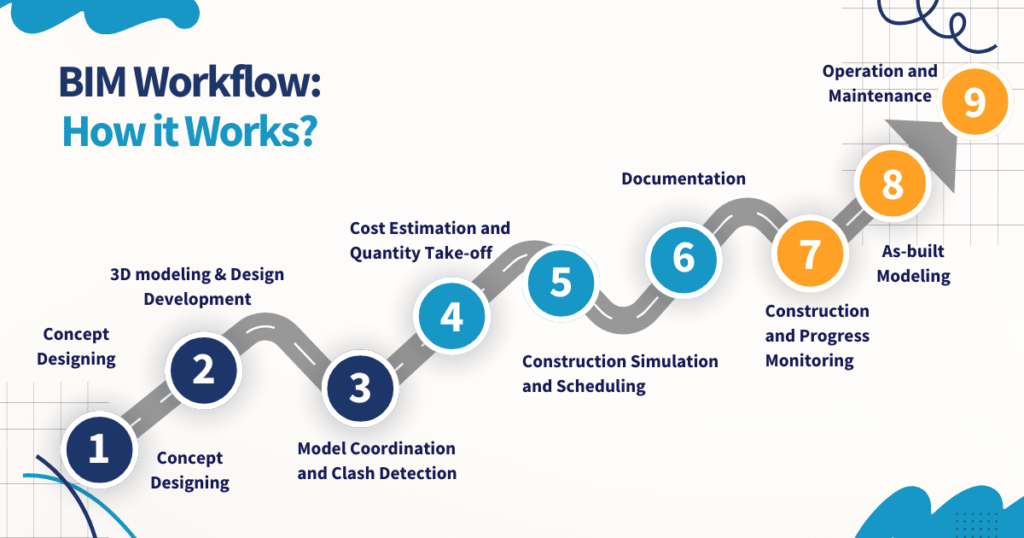
BIM, CAD, and Modern Detailing Workflows
- Revit generates details from coordinated 3D models, auto-updating views on changes.
- Clash detection via Navisworks flags conflicts early; BIM execution plans standardize naming/sharing.
- Autodesk AEC Collection enables cloud collaboration, version control, and fabrication detailing.
Common Mistakes to Avoid in Detail Drawings
- Missing key dimensions, such as slab thickness, cover to reinforcement, or sill heights.
- Inconsistent information between a building details drawing and the related plan or section.
- Vague material descriptions like “insulation” or “membrane” without specifying type or performance.
- Over-detailed drawings that show unnecessary information, making it hard to see the critical elements.
- Using non-standard symbols or abbreviations that are not explained in the legend.
- Failing to coordinate MEP penetrations with structural elements, leading to site conflicts.
- Ignoring constructability, resulting in details that are difficult or expensive to build in reality.
💡 Pro Tip: Building details drawings are a critical component of complete BIM documentation that connects design models with construction execution. Learn how to structure comprehensive project documentation for seamless coordination.
Conclusion
Clear building detail drawings, powered by Autodesk Revit, drive design precision, efficiency, and quality—reducing risks and elevating AEC outcomes.